State Management: Context API, Prop Drilling, React.memo, useMemo, and useCallback
As React applications grow, managing state becomes more challenging. What starts as a few components can quickly turn into a complex component tree where data needs to be shared across many parts of the application.
Fortunately, React provides built-in tools to manage shared state and optimize rendering performance. In this article, we'll explore prop drilling, the Context API, React re-renders, React.memo, useMemo, and useCallback, and learn when each should be used.
Why State Management Becomes Difficult
In small React applications, state usually lives inside a single component.
App
│
└── Counter
As the application grows, more components need access to the same data.
App
│
├── Navbar
├── Sidebar
├── Dashboard
│   ├── UserProfile
│   └── Settings
└── Footer
For example, multiple components may need:
Logged-in user
Theme (Light/Dark)
Language
Notifications
Shopping cart
Passing this data through many components can become difficult to manage.
Common challenges include:
Large component trees
Repeated prop passing
Unnecessary re-renders
Hard-to-maintain code
Reduced scalability
Understanding Prop Drilling
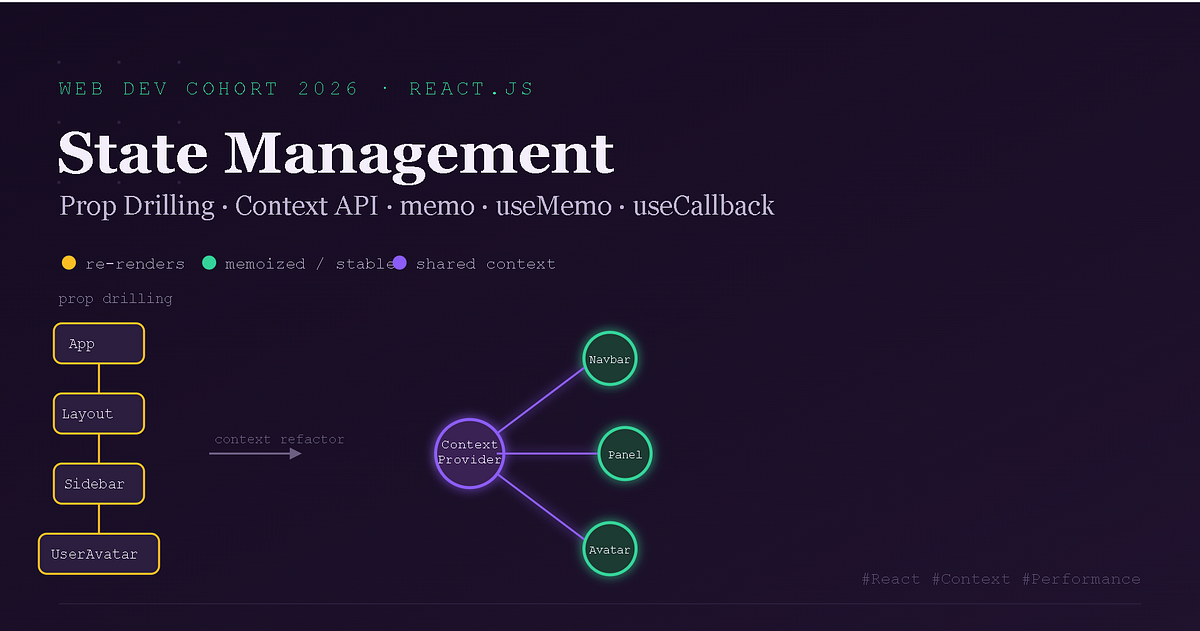
Prop drilling occurs when data is passed through multiple intermediate components just so a deeply nested component can use it.
Example:
App
 │
 ▼
Dashboard
 │
 ▼
Profile
 │
 ▼
UserInfo
Suppose UserInfo needs the current user.
Without Context API:
function App() {
  const user = { name: "Alice" };

  return <Dashboard user={user} />;
}

function Dashboard({ user }) {
  return <Profile user={user} />;
}

function Profile({ user }) {
  return <UserInfo user={user} />;
}

function UserInfo({ user }) {
  return <h2>{user.name}</h2>;
}
Notice that Dashboard and Profile don't actually use user. They simply pass it along.
This is prop drilling.
Problems with Prop Drilling
As applications grow, prop drilling introduces several problems:
Components receive props they don't use.
Updating component interfaces becomes harder.
Code becomes more difficult to maintain.
Deep component trees become harder to understand.
Imagine passing authentication data through ten components even though only the last one needs it.
The Context API
React introduced the Context API to solve prop drilling.
Instead of passing props through every component, Context allows components to access shared data directly.
App
 │
 ▼
Context Provider
 │
 ├── Navbar
 ├── Sidebar
 ├── Dashboard
 └── Profile
Every component inside the provider can access the shared state.
Creating Context
First, create a context.
import { createContext } from "react";

const UserContext = createContext();
Providing Data
Wrap components with a provider.
<UserContext.Provider value={{ name: "Alice" }}>
    <App />
</UserContext.Provider>
The value prop contains the shared data.
Accessing Context
React provides the useContext Hook.
import { useContext } from "react";

function UserInfo() {
    const user = useContext(UserContext);

    return <h2>{user.name}</h2>;
}
No prop drilling is required.
Provider and Consumer
The Provider stores shared data.
The Consumer (or useContext) reads that data.
Provider
    │
    ▼
Shared State
    │
    ▼
Consumer
When Context API Works Well
Context is ideal for state shared across many components.
Common examples include:
Authentication
Dark mode
Language selection
User preferences
Global settings
Example:
App
 │
 ▼
Theme Provider
 │
 ├── Navbar
 ├── Sidebar
 ├── Dashboard
 └── Footer
Every component can access the current theme.
Understanding React Re-renders
Whenever state changes, React renders the affected component again.
Example:
function Counter() {
    const [count, setCount] = useState(0);

    return (
        <>
            <p>{count}</p>
            <button onClick={() => setCount(count + 1)}>
                Increment
            </button>
        </>
    );
}
Each click updates the state, causing React to render the component again.
Parent-Child Re-renders
A common misconception is that only the parent renders.
In reality, when a parent renders, its children usually render as well.
App
 │
 ├── Navbar
 ├── Sidebar
 └── Dashboard
If App re-renders, React also checks its children.
Most of the time this is perfectly fine.
Why Unnecessary Re-renders Occur
Sometimes a child component receives exactly the same props but still renders because its parent rendered.
For small components this isn't a problem.
For expensive components, unnecessary renders can affect performance.
React.memo
React.memo prevents a component from rendering again if its props haven't changed.
Without React.memo
Parent renders

↓

Child renders
With React.memo
Parent renders

↓

Props changed?

↓

No

↓

Skip render
Example:
const UserCard = React.memo(function UserCard({ name }) {
    console.log("Rendered");

    return <h2>{name}</h2>;
});
If name doesn't change, React skips rendering UserCard.
When React.memo Helps
Use it when:
Components render frequently.
Rendering is expensive.
Props rarely change.
Examples:
Large tables
Dashboard widgets
Charts
Product cards
When React.memo Hurts
React.memo also performs comparisons.
For very small components, this comparison may cost more than simply rendering again.
Avoid wrapping every component with React.memo.
Optimize only when necessary.
useMemo
useMemo caches the result of an expensive calculation.
Normally:
Render

↓

Expensive Calculation

↓

Render Again

↓

Expensive Calculation Again
With useMemo
Render

↓

Calculate Once

↓

Cache Result

↓

Reuse Cached Value
Example:
const total = useMemo(() => {
    return products.reduce((sum, item) => sum + item.price, 0);
}, [products]);
The calculation only runs when products changes.
Common useMemo Use Cases
Filtering large lists
Sorting data
Expensive calculations
Dashboard statistics
Performance Tradeoffs
Caching also uses memory.
If the calculation is simple, useMemo may not improve performance.
Use it only for expensive computations.
useCallback
useCallback caches a function instead of a value.
Normally, React creates a new function on every render.
const handleClick = () => {
    console.log("Clicked");
};
After every render, handleClick is a new function.
With useCallback:
const handleClick = useCallback(() => {
    console.log("Clicked");
}, []);
React reuses the same function until its dependencies change.
Why useCallback Matters
Imagine a memoized child component.
<Child onClick={handleClick} />
Without useCallback, handleClick changes every render.
React thinks the prop changed, so the child renders again.
Using useCallback keeps the function reference stable.
useCallback vs useMemo
| useMemo | useCallback |
|---|---|
| Caches values | Caches functions |
| Returns a value | Returns a function |
| Optimizes calculations | Optimizes callbacks |
Choosing the Right Optimization Strategy
| Tool | Best For |
|---|---|
| Context API | Sharing global state |
| React.memo | Preventing unnecessary component renders |
| useMemo | Expensive calculations |
| useCallback | Stable function references |
Remember:
Optimize only after identifying a real performance problem.
Premature optimization often makes code harder to understand.
Scaling React Applications
As applications grow, good architecture becomes more important than adding optimization Hooks.
Some best practices include:
Keep state close to where it's used.
Share only truly global state with Context.
Split large components into smaller ones.
Avoid unnecessary prop drilling.
Optimize only expensive renders.
A maintainable architecture usually provides greater long-term benefits than excessive micro-optimizations.
Prop Drilling Visualization
App
 │
 ▼
Dashboard
 │
 ▼
Profile
 │
 ▼
UserInfo
Every component passes user down.
Context API Architecture
User Provider
      │
      ├── Navbar
      ├── Sidebar
      ├── Dashboard
      └── UserProfile
Every component accesses shared state directly.
Parent → Child Render Flow
State Changes
      │
      ▼
Parent Renders
      │
      ▼
Children Render
React.memo Flow
Parent Render
      │
      ▼
Props Changed?
      │
 ┌────┴────┐
 │         │
Yes        No
 │         │
Render   Skip Render
useMemo Flow
Expensive Calculation
        │
        ▼
Cache Result
        │
        ▼
Reuse Until Dependencies Change
useCallback Flow
Function Created
       │
       ▼
Cache Function
       │
       ▼
Reuse Until Dependencies Change
State Management Architecture
App
 │
 ▼
Context Provider
 │
 ├── Navbar
 ├── Sidebar
 ├── Dashboard
 │      ├── React.memo
 │      ├── useMemo
 │      └── useCallback
 └── Settings
Conclusion
As React applications grow, managing shared state and maintaining performance become increasingly important. Prop drilling can make component trees difficult to maintain, while the Context API provides a cleaner way to share global state. Understanding React's rendering behavior is the foundation for using optimization tools like React.memo, useMemo, and useCallback effectively. Rather than applying these optimizations everywhere, focus on building a clear component architecture first and optimize only where performance measurements show a real need.


